Content pack
A how-to for Nonprofit Cloud (Agentforce Nonprofit)
Your Participants Are in Nonprofit Cloud. Is Your Attendance?
Your participants are in Salesforce already. With one scan at the door, their attendance can be too. Here is how the scan works, the records it fills in, and the clicks it replaces.
Community centers. Youth programs. Food pantries. Adult education classes.
Your participants are in Salesforce already. With a card or a QR code, their attendance can be too, the moment they walk in the door.
Attendance in Salesforce with one scan at the door
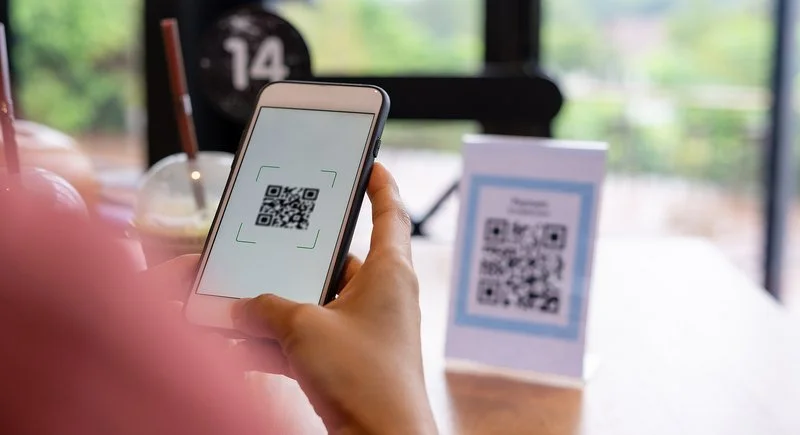
Here is a Tuesday tutoring session with a barcode or QR code. Participants check in by scanning, and Salesforce is up to date before the class even starts. The Nonprofit Cloud records stay exactly as they are. Only the way attendance gets filled in changes.
Gimbal Barcode is a native barcode and QR code solution for Salesforce. It is a managed package listed on the Salesforce AppExchange. It lets you generate barcodes and QR codes from data on any Salesforce record, and scan them in Salesforce to insert, update, or view records, or run custom business logic.
What the participant has
- A photo ID card with a barcode or QR code, printed from their Salesforce record. (See Create ID Cards and Track Attendance.)
- Or a QR code on their phone. You send a unique link by email or SMS. It opens a personal QR code they show at the door, just like a concert ticket. No app to install. (See QR Codes, Simplified, and Fully Native in Salesforce.)
What happens at the door
- A staff member or volunteer opens the scan screen in Salesforce on a phone, tablet, or a computer with a USB scanner.
- They choose Tuesday's tutoring session.
- Maria walks in and holds up her card.
- The scan finds Maria's record and updates her attendance for that session. The who, what, and when are recorded directly in Salesforce, in realtime. (Exactly which record and status a scan writes is configured to match your org.)
- The next person scans. A line of 30 kids moves about as fast as they can hold up a card.
- After the session, anyone who did not scan is still listed as Enrolled. You mark them Absent using the normal Attendance tab steps below.
If you build in Salesforce Flow, Gimbal also includes a scanner component you drag onto the Flow canvas. One Flow can serve desktop and mobile. (See Gimbal Barcode Scanner for Flow.)
You can watch the attendance demo here: Video: Create ID Cards and Track Attendance.
Scanning vs clicking, side by side
One AppExchange reviewer put the equipment question simply: "You can use the camera on the mobile app. You can use a Zebra scanner. You can use a computer with a USB Scanner. Whatever you need, it works."
Why attendance is the part that gets postponed
Without scanning, attendance is often the last thing to get built. An organization moves to Nonprofit Cloud, and attendance is moved to "phase two." The participants are in Salesforce, but the sign-in sheet is still on a clipboard by the door. Someone types it in later, when they have time.
Program teams ask for the scan version in public: "How to add attendance of our students using QR code and update that info back to Salesforce. Also maintain integrity of that attendace." (Trailblazer Community, May 2024) Nonprofit Cloud already has a place for attendance. A scan is simply the fastest way to fill it in.
The records behind attendance in Nonprofit Cloud
If you set this up, it helps to know which record a scan fills in. Your org may say Nonprofit Cloud or Agentforce Nonprofit. The record names are the same. Salesforce describes these objects in its Trailhead modules (records that track your programs, enrollments and deliveries).
- Person Account The participant Maria, age 14
- Program A high-level area of your mission Youth Programs
- Program Enrollment Links a participant to a program Maria is enrolled in Youth Programs
- Benefit A service you deliver After-School Tutoring
- Benefit Assignment Connects a participant to a benefit Maria is assigned to tutoring
- Benefit Schedule Creates the sessions (one time, recurring, or irregular) Tutoring, every Tuesday and Thursday
- Benefit Session One session, with a start and end date and time Tuesday, 4:00 to 5:30 PM
- Benefit Disbursement Records that a person received the benefit, and how much Maria attended Tuesday's session
The two records that matter most on the day are the Benefit Session (the class) and the Benefit Disbursement (each person's line for that class). Salesforce also lets you create a disbursement "ad hoc," which is useful for drop-in visits that are not on a schedule.
One trailblazer summed up how this feels at first: "We are confused between Programs, Program Engagement, Service, Service Delivery, and Service Session." (Trailblazer Community) Those are the older PMM names, but the feeling is the same. Keep the table above handy.
Without a scanner: the standard Attendance tab
This is the click-through process a scan replaces, and the one you still use to mark anyone who did not scan as Absent. These steps follow Salesforce's own Trailhead unit, Manage schedule participants and attendance.
Set up once per program
- Enroll each participant in the program (Program Enrollment).
- Assign the benefit to each participant (Benefit Assignment).
- Create a Benefit Schedule. Salesforce creates the Benefit Sessions for you.
- Add participants to the schedule (up to 100 at a time) or to a single session (up to 20 at a time).
On the day of each session
- Open the Benefit Session record.
- Click the Attendance tab. Each person starts with the status Enrolled.
- Select the people who came. Click Edit Status and choose Completed.
- Select the people who did not come. Click Edit Status, choose Absent, and set the quantity to 0.
Salesforce then says: "All of the benefit disbursement records for these participants are updated with the new status values." Totals roll up to the benefit and the program, so your reports stay current.
This is a solid, native process. Step 7 is the one a scan takes over: instead of a staff member working from a list after class, each person is marked as they walk in.
Before you start: a short checklist
- Your schedule exists in Salesforce. Benefit Schedules and Sessions should be created before the first class. A scan needs a session to land on.
- Every participant has a record. Walk-ins are fine, but decide now how you will handle a person with no card.
- Decide card or phone. Older participants often prefer a card. Teens often prefer a QR on their phone. You can offer both.
- Pick your scanning device. Test it at the real door, with the real lighting and the real Wi-Fi.
- Decide what "Absent" means. Will someone mark the unscanned people Absent after each session, or at the end of the week?
- Think about privacy. A card should show only what staff need at the door. Keep sensitive details on the Salesforce record, behind your normal permissions.
- Know what your funders count. Many funders ask for two numbers: how many different people you served, and how many visits in total. The NASCSP definition of an unduplicated count is "counting one person one time for any given service." When each visit is its own record in Salesforce, both numbers come from the same data.
Common mistakes I see
- Printing cards before the participant records are clean. Merge duplicates first.
- Scanning into a session that was never created. Build the schedule first.
- Keeping the paper sheet "just in case" for months. Then nobody trusts either one.
If you are still on NPSP and PMM
Many organizations still run the Nonprofit Success Pack (NPSP) with the Program Management Module (PMM). Salesforce stopped adding new features to its managed packages, including NPSP (Salesforce Ben), and as of December 2025 NPSP is no longer offered as a preconfigured package in new production orgs (Trailhead). New orgs start on Nonprofit Cloud.
In PMM, attendance lives on the Service Session, with a Track Attendance component and an Attendance Status field on each Service Delivery (Trailhead). One admin on Reddit described the pain well: "adding the attendance by day takes ages as there are a lot of participants." (r/salesforce)
The scanning idea is the same. The scan updates the records you already use. If you plan to move to Nonprofit Cloud later, a scan-based process can move with you, because the door routine stays the same. Only the records behind it change.
FAQ
Can Salesforce scan barcodes on its own?
Partly. Salesforce has a BarcodeScanner feature for developers, but it "does not and cannot function when running in a web browser." It works inside the Salesforce mobile app and Mobile Publisher apps (Salesforce Developers). Someone still has to build the screens and the logic. Gimbal Barcode gives you that, ready to configure, on desktop and mobile.
Do participants need to download an app?
No. A participant can carry a printed ID card, or show a QR code that opens from a link you send by email or SMS. Staff scan it. As one program director wrote, "The last thing I want to do is download an app." We agree.
Will older participants manage it?
A card is the simplest option. They hold it up, the staff member scans it, and they go in. Nobody has to type or remember a password.
Do we need a developer?
Gimbal Barcode installs from the AppExchange as a managed package and is configured inside Salesforce. Many teams have their Salesforce admin work with us on setup. If your process is unusual, it can be configured and customized to fit.
Will it fit our custom org?
It works with the records you already have. It does not replace your data model or take over your org. A scan inserts, updates, or views the Salesforce records you choose.
How do I get an unduplicated count for my funder?
If every visit is its own record, a standard Salesforce report can count unique participants and total visits from the same data. Scanning helps because every visit is recorded, not only the ones someone remembered to type in.
Does scanning work without internet?
This depends on your sites and devices. Tell us where you run programs, and we will tell you plainly what will work there.
See it in action
Gimbal Barcode is used by 100+ organizations and has 91 reviews on the AppExchange, with a 4.87 average. One reviewer wrote: "I will be recommending Gimbal Logic for my nonprofit clients who need to quickly scan in program participants and track attendance at events and classes."
If you have questions about anything in this article, or if your requirements differ a lot or a little from what is shown here, please get in touch. We are happy to show you a short live demo in your own setup and talk about next steps.
FOR MICHAELWhy this article: research, sources, title options, open questions
1. SEO BLOCK
| Field | Value |
|---|---|
| H1 (on page) | Your Participants Are in Nonprofit Cloud. Is Your Attendance? |
| Title tag (under 60) | Nonprofit Cloud Attendance: Click It or Scan It |
| Meta description (under 155) | How attendance works in Salesforce Nonprofit Cloud (Agentforce Nonprofit), step by step, and how to scan a card or QR code at the door instead. |
| URL slug | /articles/nonprofit-cloud-attendance-scan-instead-of-click |
| Primary keyword | nonprofit cloud attendance |
| Secondary keywords | salesforce attendance tracker, nonprofit cloud program management, salesforce barcode scanner, qr code check in, agentforce nonprofit, benefit session attendance |
| Byline | Michael Robbins |
| Tags | Salesforce, Nonprofit Cloud, Attendance, QR Code, Barcode |
Internal links used in the article (Gimbal's existing posts and pages)
- https://www.gimballogic.com/articles/create-id-cards-and-track-attendance-in-salesforce
- https://www.gimballogic.com/articles/qr-codes-simplified-and-fully-native-in-salesforce
- https://www.gimballogic.com/articles/from-google-sheets-to-salesforce-upgrading-your-nonprofits-barcode-attendance-tracker
- Also: https://www.gimballogic.com/articles/gimbal-barcode-scanner-for-flow and https://www.gimballogic.com/attendance-service-delivery
External authority links used in the article
- Trailhead, Manage schedule participants and attendance: https://trailhead.salesforce.com/content/learn/modules/attendance-and-benefit-tracking-in-nonprofit-cloud-for-programs/manage-schedule-participants-and-attendance
- Trailhead, Meet the records that track your programs: https://trailhead.salesforce.com/content/learn/modules/programs-and-benefits-in-nonprofit-cloud-for-programs/meet-the-records-that-track-your-programs
- Trailhead, Get to know enrollments and deliveries: https://trailhead.salesforce.com/content/learn/modules/attendance-and-benefit-tracking-in-nonprofit-cloud-for-programs/get-to-know-enrollments-and-deliveries
- Trailhead, Meet NPSP: https://trailhead.salesforce.com/content/learn/modules/nonprofit-success-pack-basics/meet-nonprofit-success-pack
- Salesforce Developers, BarcodeScanner compatibility: https://developer.salesforce.com/docs/atlas.en-us.mobile_offline.meta/mobile_offline/use_barcodescanner_compatibility.htm
- NASCSP, Unduplicated Counts one-pager: https://nascsp.org/wp-content/uploads/2021/01/Unduplicated-Counts-One-Pager_final_draft-to-post.pdf
OTHER TITLE OPTIONS
All under 65 characters, all true, no banned words. My pick is the H1 above, because it echoes Michael's own campaign line ("Your participants are in Salesforce already, the count often is not") and names the platform people search.
| # | Title | Chars | Why it could work |
|---|---|---|---|
| 2 | Nonprofit Cloud Attendance: Stop Clicking, Start Scanning | 57 | Exact keyword first, clear promise |
| 3 | How to Take Attendance in Nonprofit Cloud (Then Scan It) | 56 | Plain how-to, matches the brief's working title |
| 4 | QR Code Check-In for Nonprofit Cloud, Step by Step | 50 | Uses the strong "qr code check in" search family |
| 5 | The Salesforce Attendance Tracker Hiding in Nonprofit Cloud | 59 | Curiosity; the Attendance tab is real but few people find it |
3. IMAGES
| # | Placement | What it shows | Alt text | Source | Status |
|---|---|---|---|---|---|
| 1 | Hero, under the H1 | A visitor checking in at a registration desk | Staff member checking in a program participant at a front desk | https://images.squarespace-cdn.com/content/v1/6125103df0824635ed546894/ea3587f9-bef3-4184-83fc-c7da2d18ed2f/visitor+checking+in+at+registration+desk.jpg (already on gimballogic.com/attendance-service-delivery) | Use as is |
| 2 | "The records behind attendance" section | A simple diagram: Program > Program Enrollment > Benefit Assignment > Benefit Schedule > Benefit Session > Benefit Disbursement | Diagram of the Nonprofit Cloud records used to track attendance | Recreate from the Trailhead unit "Meet the records that track your programs" (link in Part 4). Draw in Gimbal blue #009DE0 on white | Michael to make (or we draw it) |
| 3 | "Without a scanner: the standard Attendance tab" section, after step 8 | The Attendance tab on a Benefit Session, with the Edit Status button and Completed / Absent options | Attendance tab on a Benefit Session in Salesforce Nonprofit Cloud | Screenshot from a Nonprofit Cloud sandbox or Trailhead playground, following the Trailhead unit "Manage schedule participants and attendance" | Michael to capture |
| 4 | "Attendance in Salesforce with one scan at the door" section, after "What the participant has" | Sample photo ID card with barcode (John Doe) | Sample participant photo ID card with a barcode, generated from Salesforce | https://images.squarespace-cdn.com/content/v1/6125103df0824635ed546894/1723108376188-X3UEKZK3VQBR0ARQANR0/id-card-john-doe.png | Use as is |
| 5 | "What happens at the door" | A phone scanning a QR code | Phone camera scanning a participant's QR code at check-in | https://images.squarespace-cdn.com/content/v1/6125103df0824635ed546894/1757715951346-Y75M7PH5FPT7VEV5O4VV/scanning+a+qr+code.jpg | Use as is |
| 6 | Same section, after step 6 | The Gimbal scan screen next to the updated Benefit Disbursement record (Completed) | Scanning a card in Salesforce updates the participant's attendance record | Screenshot of Gimbal's scan screen in a Nonprofit Cloud org. If none exists, use https://images.squarespace-cdn.com/content/v1/6125103df0824635ed546894/1737503819587-Z6E14LF4F0LG8G8UPJV7/Barcode-Scan-Flow-Demo-Optimized-New.png as a stand-in | Michael to capture (stand-in: use as is) |
Also embed the YouTube demo https://youtu.be/h5TOsaUGv3c in the scan section.
4. SOURCES (every link)
Salesforce (official)
- Trailhead, Manage schedule participants and attendance: https://trailhead.salesforce.com/content/learn/modules/attendance-and-benefit-tracking-in-nonprofit-cloud-for-programs/manage-schedule-participants-and-attendance (Attendance tab, Enrolled default, Edit Status, Completed / Absent with quantity 0, "All of the benefit disbursement records...", 20 per session, 100 per schedule)
- Trailhead, Meet the records that track your programs: https://trailhead.salesforce.com/content/learn/modules/programs-and-benefits-in-nonprofit-cloud-for-programs/meet-the-records-that-track-your-programs (object definitions)
- Trailhead, Get to know enrollments and deliveries: https://trailhead.salesforce.com/content/learn/modules/attendance-and-benefit-tracking-in-nonprofit-cloud-for-programs/get-to-know-enrollments-and-deliveries (disbursement, ad hoc)
- Trailhead, Meet NPSP: https://trailhead.salesforce.com/content/learn/modules/nonprofit-success-pack-basics/meet-nonprofit-success-pack ("As of December 2025, NPSP is no longer offered as a preconfigured package in production orgs"; Nonprofit Cloud now called Agentforce Nonprofit)
- Trailhead, PMM quick look: https://trailhead.salesforce.com/content/learn/modules/program-management-module-quick-look/get-to-know-program-management-module
- Trailhead, Add attendance summary data (PMM): https://trailhead.salesforce.com/content/learn/projects/configure-permissions-and-settings-in-program-management-module-pmm/add-attendance-summary-data
- Salesforce Developers, BarcodeScanner compatibility: https://developer.salesforce.com/docs/atlas.en-us.mobile_offline.meta/mobile_offline/use_barcodescanner_compatibility.htm
Third party
- Salesforce Ben, State of Salesforce nonprofit offerings in 2026: https://www.salesforceben.com/the-state-of-salesforce-nonprofit-offerings-in-2026/
- NASCSP, Unduplicated Counts one-pager: https://nascsp.org/wp-content/uploads/2021/01/Unduplicated-Counts-One-Pager_final_draft-to-post.pdf
Real user quotes
- Trailblazer AMA, May 2024 (QR attendance back into Salesforce): https://trailhead.salesforce.com/trailblazer-community/feed/0D54V00007akVfP
- Trailblazer thread ("We are confused between Programs..."): https://trailhead.salesforce.com/trailblazer-community/feed/0D54S00000DcirlSAB
- r/salesforce ("adding the attendance by day takes ages"): https://www.reddit.com/r/salesforce/comments/1cxch44/how_do_i_bulk_add_attendance_into_service/
- r/nonprofit ("The last thing I want to do is download an app"): https://www.reddit.com/r/nonprofit/comments/1glydh3/_/lw1pqfs/
Gimbal's own site (product claims come only from these)
- https://www.gimballogic.com/gimbal-barcode (managed package, AppExchange, generate and scan, insert/update/view records or run custom logic, desktop and mobile)
- https://www.gimballogic.com/attendance-service-delivery (scan photo ID membership cards to track attendance, desktop and mobile)
- https://www.gimballogic.com/nonprofit-solutions (barcode-enabled ID card or digital barcode linked to the profile; scans update records in Salesforce)
- https://www.gimballogic.com/articles/qr-codes-simplified-and-fully-native-in-salesforce (QR link by email or SMS, shown at the door, no app installation)
- https://www.gimballogic.com/articles/create-id-cards-and-track-attendance-in-salesforce (photo ID cards, scan to record attendance)
- https://www.gimballogic.com/articles/gimbal-barcode-scanner-for-flow (Flow component, desktop and mobile)
- https://www.gimballogic.com/articles/from-google-sheets-to-salesforce-upgrading-your-nonprofits-barcode-attendance-tracker
- https://www.gimballogic.com/articles/enhancing-nonprofit-outcomes-with-salesforce-barcode-attendance-tracking
- Demo video: https://youtu.be/h5TOsaUGv3c
- AppExchange listing: https://appexchange.salesforce.com/appxListingDetail?listingId=a0N30000000ptq1EAA (91 reviews, 4.87; review quotes)
5. CHECK WITH MICHAEL
- The big one: does a Gimbal scan update a Nonprofit Cloud Benefit Disbursement (status Completed) on a Benefit Session out of the box, or is that a configuration you set up per org? The article says the scan "marks her disbursement for that session as attended." Gimbal's site only says scans "insert, update, or view records." If it is configuration, add one line: "We configure this for your org."
- Drop-ins: the table says a scan can create the record for a walk-in (an ad hoc disbursement). Confirm, or delete that row.
- Choosing the session before scanning (step 2 of the scan version): is that how your screen works?
- PMM: OK to say the same scan approach works for PMM Service Deliveries?
- Offline: the FAQ answer avoids a claim. Do you want to say more?
- "Do we need a developer?" answer: OK to say "Many teams have their Salesforce admin work with us on setup"?
- Proof numbers: 91 reviews and 4.87 are from August 2026. Please re-read the live AppExchange listing before publishing. "100+ organizations" is your number from 2026-10-05.
- "A line of 30 kids moves about as fast as they can hold up a card." An illustration, not a measured claim. Keep or cut.
- NPSP wording: we say Salesforce "stopped adding new features" to NPSP (source: Salesforce Ben). Sources disagree on the year (2023 vs 2024), so the article gives no year. OK?
- Example names (Maria, Tuesday tutoring) are made up for illustration and not tied to any client. OK?
- Video: confirm https://youtu.be/h5TOsaUGv3c is still the attendance demo you want embedded.
- Screenshots 3 and 6 need a Nonprofit Cloud sandbox. Do you have one with Gimbal installed?
6. WHY THIS ARTICLE (for Michael)
Every point below links to a public page or to the research summary on the Research tab.
Why this topic
- Salesforce's own attendance process has no scanning. The official Trailhead unit for Nonprofit Cloud attendance is click-only: open the Benefit Session, use the Attendance tab, set Completed or Absent (Trailhead; search research section 5b).
- People ask for exactly this, in public. "How to add attendance of our students using QR code and update that info back to Salesforce" (Trailblazer, May 2024). "adding the attendance by day takes ages" (r/salesforce). In the 2026-10-13 Reddit sample, 14 speakers called Salesforce's own attendance tools clunky (search research section 3).
- Nobody covers it. Blackthorn writes about one-off event check-in, not weekly program sessions. OneTap writes about nonprofit attendance but never says Salesforce. Bonterra and CharityTracker almost never say "attendance" (competitor study sections 3 and 6, gap 1).
- It does not repeat your 18 posts. Your existing attendance posts are general "why barcodes help" pieces, 126 to 807 words, with no Nonprofit Cloud records, no steps, no tables (competitor study section 2). This one is a how-to with the real records and clicks.
- Timing. New orgs start on Nonprofit Cloud (Trailhead, Meet NPSP), and "salesforce nonprofit cloud" and "agentforce nonprofit" each fill all 10 Google autocomplete slots (search research cluster E). Admins are learning the new data model now.
Why this title
- It echoes your own line from the live email campaign: "Your participants are in Salesforce already, the count often is not."
- It names the platform people search. "salesforce nonprofit cloud" and "agentforce nonprofit" are both strong autocomplete terms (search research cluster E). The body uses both names, as Trailhead does.
- The title tag carries the exact keyword "nonprofit cloud attendance" and the click-vs-scan promise.
- Honest limit: "nonprofit cloud attendance" itself shows no autocomplete. That means low volume, not zero searches (search research section 1). So the body also targets "salesforce attendance tracker" and "salesforce barcode scanner", which do show up (clusters C and D).
Why this structure and length
- About 2,000 words, with a TOC, tables, steps and an FAQ. The competitor pages that came up in search do this: Blackthorn's nonprofit guide (about 2,700 words, 2 tables, FAQ) and OneTap's attendance-percentage guide (about 2,970 words, table, 7-question FAQ) (competitor study sections 3.1, 3.3 and 5).
- Your posts average about 700 words, one stock photo, and only one has an FAQ (competitor study section 2). Longer, structured posts give Google more to match.
- Real screenshots stand out: Blackthorn's check-in post had none, OneTap uses 10 or more per post (competitor study sections 3.1 and 5). Hence images 3 and 6.
- No invented numbers. Most competitor pages use unsourced stats (competitor study section 5). Ours uses only sourced facts and your AppExchange proof.
Which real question each FAQ answers
| FAQ | Real question it answers | Source |
|---|---|---|
| Can Salesforce scan barcodes on its own? | "Does anyone use a scanner to scan individuals into salesforce?" | Trailblazer |
| Do participants need to download an app? | "The last thing I want to do is download an app" | r/nonprofit |
| Will older participants manage it? | "simple enough for 80 year old attendees" | r/nonprofit |
| Do we need a developer? | "No, definitely not a developer, just an end user that is trying to come up with a solution." | r/salesforce |
| Will it fit our custom org? | "Most apps I found nearly always tried to replace what I had developed and take over the platform." | AppExchange review |
| How do I get an unduplicated count? | "not easily get a count of unduplicated visitors" and "we needed them to count those participant numbers for the grant objectives" | Bigger Boat Consulting · r/nonprofit |
| Does scanning work without internet? | "It has to work on an iPad and it has to have an offline mode." | r/nonprofit |
All Reddit and AppExchange quotes were checked word for word on 2026-10-13. Trailblazer quotes were read live on 2026-10-22 (search research section 4). Note: the Trailblazer Community site goes read-only on 2026-10-30; old threads stay as an archive, so the links should keep working (search research section 5g).
What this draft does NOT prove
- No search volume numbers. No no-cost tool gave them (search research section 7).
- Real Google rank of competitor pages is unknown; "came up in search" means our search tool only (competitor study section 1).
- Whether Gimbal writes to Nonprofit Cloud Benefit Disbursements out of the box: see Part 5, item 1.